# Switch on a LED using Rust when a button is pushed on ESP32
- Canonical URL: https://leandeep.com/switch-on-a-led-using-rust-when-a-button-is-pushed-on-esp32/
- Author: Olivier Eeckhoutte
- Published: 2025-03-28T14:49:00+02:00
- Updated: 2025-03-28T14:49:00+02:00
- Language: fr
- Tags: Rust, ESP32
- License: CC BY-NC 4.0 (https://creativecommons.org/licenses/by-nc/4.0/)
The idea of this article is to explore how to switch on a LED when a push button is pressed. Once it is release the LED is switched off.
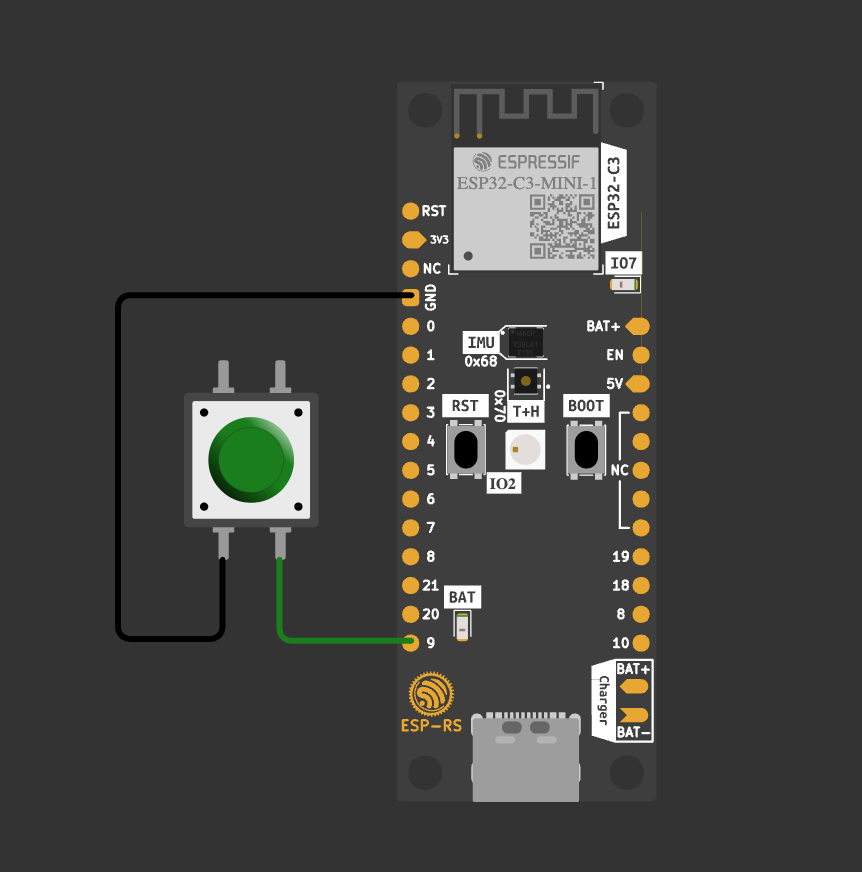
## Prerequisites
```
[dependencies]
log = "0.4"
esp-idf-svc = { version = "0.51", features = ["critical-section", "embassy-time-driver", "embassy-sync"] }
esp-idf-hal = "0.45.2"
```
## Code
Now update `main.rs` and add this code:
```
use esp_idf_hal::delay::FreeRtos;
use esp_idf_hal::gpio::PinDriver;
use esp_idf_hal::peripherals::Peripherals;
fn main() -> ! {
esp_idf_svc::sys::link_patches();
// Bind the log crate to the ESP Logging facilities
esp_idf_svc::log::EspLogger::initialize_default();
log::info!("Starting program...");
// Get ESP-IDF peripherals
let peripherals = Peripherals::take().unwrap();
let pins = peripherals.pins;
let mut led = PinDriver::output(pins.gpio2).unwrap();
let button = PinDriver::input(pins.gpio35).unwrap();
loop {
if button.is_high() {
log::info!("Switch ON");
led.set_high().unwrap(); // Switch ON LED
} else {
log::info!("Switch OFF");
led.set_low().unwrap(); // Switch OFF LED
}
FreeRtos::delay_ms(100u32);
}
}
```
## Build and Run
```
cargo build
espflash flash target/xtensa-esp32-espidf/debug/blink --monitor
```